So recently I had to deploy a vpn server which supports sso, so that company user can login to the vpn server using the company idp and securely access the company private server.
Split tunnel
So instead of routing all the internet traffic from the vpn server which wasn't necessary since goal wasn't to ensure privacy instead was to allow secure access to company's intranet also routing all traffic through vpn can take more resource and memory and bandwidth so decided to route only specific traffic. After connecting with vpn client will add the route in client pc .
# route
Destination     Gateway         Genmask         Flags Metric Ref    Use Iface

10.0.0.0        192.168.216.1   255.255.255.0   UG    0      0        0 tun0
192.168.216.0   0.0.0.0         255.255.255.0   U     0      0        0 tun0
To check if traffic routed correctly through vpn or not can run traceroute command to check through which route packets goes.
Goes through tunel gateway
traceroute to web.dabı.com (10.0.0.47), 30 hops max, 60 byte packets
1 192.168.216.1 (192.168.216.1) 36.633 ms 37.575 ms 38.177
Goes through my reliance router
traceroute to google.com (142.250.195.14), 30 hops max, 60 byte packets
1 reliance.reliance (192.168.29.1) 1.285 ms 1.358 ms 1.525 ms
One thing need to ensure also is that we have appropriate firewall rules being setup on vpn server as basically user can
add route like 0.0.0.0 to make all the traffic through vpn which we don't want so we must add appropriate rules.
So basically in this we host two zones one in public and other in private. So when a user query something using the public dns server it will resolve the query to public records but when connected with vpn or inside the intranet and uses private dns server then the private zone will be used.
So in route53 we create public and private hosted zone for same domain and in public hosted zone we add the public ip of instance while in private we add private of the server.
Now inside the vpc if any server tries to dns name resolution it will use the 10.0.0.2 aws route53 dns resolver which will resolve the queries to private ip address while in public if user query through his isp or 8.8.8.8 it will point to public records.


Note: When split dns is added ensure records are properly not missed in private as if records doesn't exist in private but do exist in public then it will fail to resolve domain it won't fallback to public with route53
DNS RESOLUTION ISSUE WITH VPN
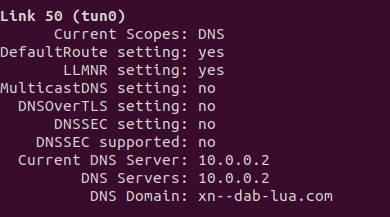
- In linux when running systemd-resolve I got issues if I hadn't specified dns domain basically then all my dns traffic was being through my ips :( even though in pritunl server config domain was optional. The above issue and was able to identify through wireshark dns traffic and for fix in pritunl config specified the domains which needed to be resolved through dns server.
https://openvpn.net/vpn-server-resources/troubleshooting-dns-resolution-problems/
https://github.com/systemd/systemd/issues/7182
https://gitlab.gnome.org/GNOME/NetworkManager-openvpn/-/issues/10
https://systemd.io/RESOLVED-VPNS/


With VPN

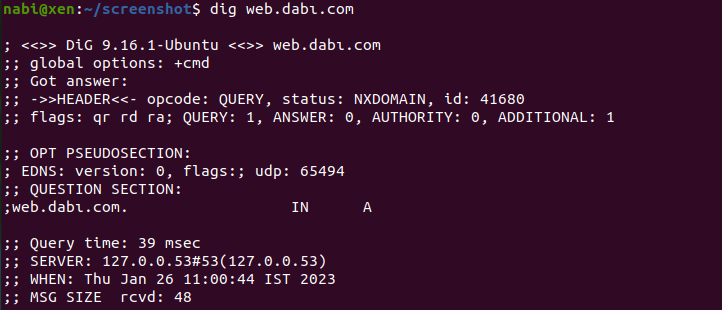
Without vpn
nxdomain as record doesn't exist in public hosted zone
Also regardless if in aws public hosted zone instead of adding ip address I guess can add public ipv4 dns which would resolve to private inside vpc while outside resolve public.

Choosing the VPN
Twingate
- Initial deployment and configuring was easy and doesn't make much time also it had zero trust.
https://www.youtube.com/watch?v=gy7feeuoSPM
Openvpn access server
Pritunl

- Deployment is easy and configuration https://docs.pritunl.com/docs/installation
- Unlike above vpn provider had the cost per user license so as user increase the cost will increase too :( . But in this this we can add as many as users and unlimited devices for basic usage this is good. Advance features such as sso would require enterprise version costing 70$ per month for education purpose enterprise version is free too.
- vpn protocols supported openvpn and wireguard
- ipsec for site to site.
Todo
- Try out the wireguard protocol as its more faster than opevpn. Current version of wireguard seems to have only WireGuard 4000 loc while opevpn has 600,000 lines of code. source